Gamma.site has become a popular choice for building presentations, landing pages, and lightweight portfolios without writing code. But what happens when you need to take your published Gamma page and host it independently? Exporting from Gamma to HTML gives you full ownership of your content and the freedom to deploy anywhere.
This guide covers exactly how that process works, what gets preserved, and how to go from a Gamma page to a self-hosted site in minutes.
Why Export a Gamma Page to HTML?
Gamma is designed for speed. You can build a polished page in minutes using AI-assisted content generation. But there are real reasons to move your finished pages out of Gamma and into standalone HTML:
- Independent hosting — Host on Netlify, Vercel, GitHub Pages, or your own server at zero cost
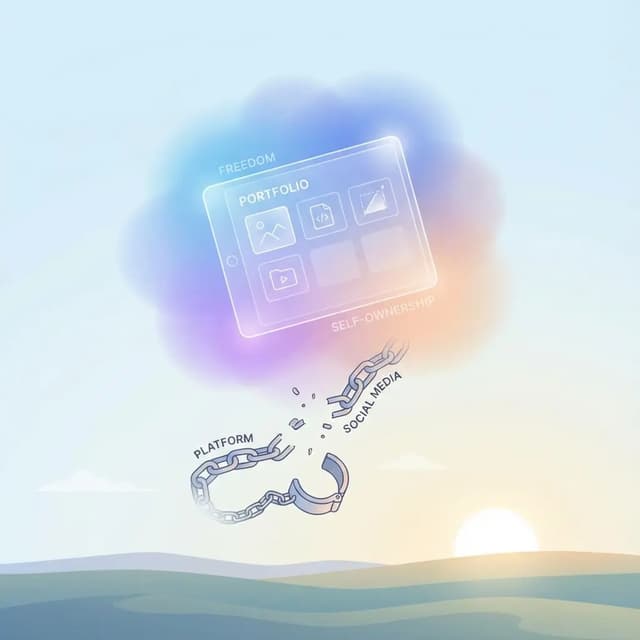
- No platform dependency — Your page works even if Gamma changes pricing, features, or shuts down
- Custom domain control — Point any domain to your exported files without Gamma's branding
- Performance — Static HTML loads faster than platform-rendered pages, improving Core Web Vitals
- Client handoff — Deliver clean code to a client who does not need a Gamma account
Whether you built a product landing page, a startup pitch deck published as a website, or a personal portfolio, exporting to HTML is the path to full control.
Ready to export your Gamma page right now? Try NoCodeExport for free and get your HTML files in under two minutes.
How Gamma-to-HTML Export Works with NoCodeExport
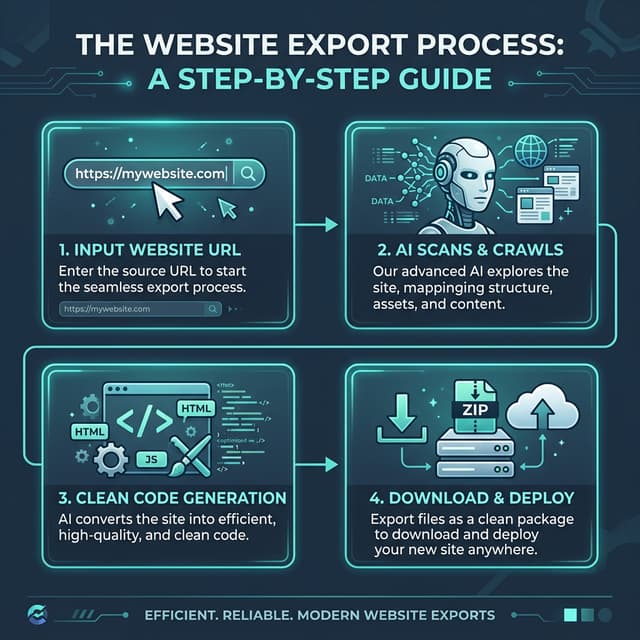
NoCodeExport works as a website code exporter that captures published web pages and converts them to clean, self-contained HTML, CSS, and image files. Here is the process for Gamma pages:
- Publish your Gamma page — Make sure it is live and accessible via a public URL (either a
gamma.appsubdomain or a custom domain). - Paste your URL into NoCodeExport — Enter the published page URL at nocodeexport.com.
- Run the scan — NoCodeExport launches a headless browser, loads your page fully (including scroll-triggered content), and captures the rendered DOM.
- Configure your export — Choose single page or multi-page export, form handling preferences, and optimization settings.
- Download your ZIP — Get a ZIP file containing your HTML, CSS, JavaScript, and all referenced images.
The entire process typically completes in 60 to 90 seconds for a single Gamma page.
What Gets Preserved
When you export a Gamma page to HTML, the following elements carry over:
| Element | Preserved? | Notes |
|---|---|---|
| Page layout and structure | Yes | Grid layouts, sections, and spacing are maintained |
| Text content | Yes | Headings, paragraphs, lists, and inline formatting |
| Images | Yes | Downloaded and included in the ZIP (Pro) or hotlinked (Free) |
| Basic styling | Yes | Colors, fonts, backgrounds, and spacing |
| Responsive design | Yes | Mobile and tablet layouts are captured from the rendered output |
| Internal links | Yes | Links between exported pages are rewritten for local navigation |
| Meta tags | Yes | Title, description, and Open Graph tags are preserved |
Known Limitations
Gamma pages have some platform-specific features that do not translate directly to static HTML:
- Interactive embeds — Embedded third-party content (YouTube, Figma, Google Sheets) remains as iframe references. These will only work when the exported site is hosted online, not when opened locally as a file.
- Gamma AI features — AI-powered content suggestions and editing tools are part of the Gamma editor, not the published page. They are not included in any export.
- Gamma-specific animations — Some transition effects that rely on Gamma's JavaScript runtime may not reproduce identically in the static export. NoCodeExport includes scroll-reveal lightweight helpers that recover most animation behavior.
- Nested card interactions — Gamma's card-based layouts with expand/collapse behavior may export in their expanded state. Complex card interactions that depend on Gamma's runtime will be static.
- Comments and reactions — If your Gamma page has commenting or reaction features enabled, these are platform-dependent and will not be included in the exported HTML.
For most landing pages, portfolios, and presentation-style sites, these limitations are minor. The core visual layout and content come through cleanly.
Deployment Checklist
After downloading your exported ZIP, follow this checklist to get your Gamma page live on independent hosting:
- Unzip your files and verify the folder structure (HTML files, CSS, images folder)
- Open index.html locally to confirm the page renders correctly in your browser
- Check all images load properly (Pro plan downloads images; Free plan hotlinks them)
- Test internal links if you exported multiple pages
- Choose a hosting provider:
- Netlify — Drag and drop the folder for instant deployment
- Vercel — Connect via GitHub for continuous deployment
- GitHub Pages — Push to a repository and enable Pages in settings
- Cloudflare Pages — Free tier with bandwidth subject to current plan terms
- Set up your custom domain with your hosting provider
- Verify mobile responsiveness on your live deployment
- Submit your sitemap to Google Search Console if the page is SEO-critical
For a detailed comparison of free hosting options, see our free hosting guide.
When Export Makes More Sense Than Staying on Gamma
Exporting is the right move when:
- Your Gamma page is finished and will not change frequently
- You need to cut costs by eliminating a platform subscription
- A client needs to own the final deliverable without a Gamma dependency
- You want to combine the exported page with a larger site or custom backend
- You need full control over SEO, analytics, and server configuration
If you regularly update your content and rely on Gamma's AI editing features, staying on the platform may be more practical. But for finished pages, export gives you a permanent, portable version of your work.
Ready to Export?
Gamma is a fantastic tool for building presentations and landing pages, but you do not have to stay locked into their hosting. Exporting to HTML gives you full ownership, better performance, and zero hosting costs.
Export your Gamma site for free with NoCodeExport and start hosting on your own terms.