
Once you've exported your website from a no-code builder, you need a place to put it. The good news? We are living in the golden age of static hosting. There are incredible infrastructure platforms available for free.
Whether you've exported from Framer, Webflow, Wix, or Squarespace, compare each provider's current limits and test your static package before launch.
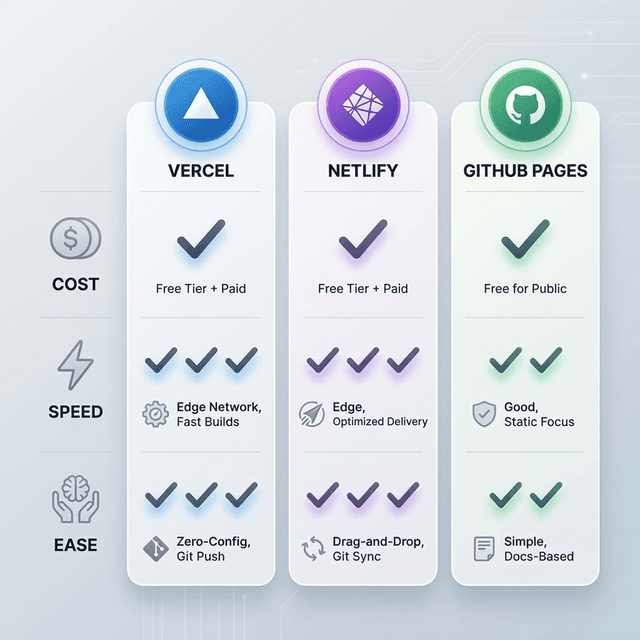
Here are our top 5 picks for 2026.
1. Vercel
Best for: Next.js users and performance freaks.
Vercel is the company behind Next.js. Their edge network is blazing fast.
- Pros: Incredible performance, ease of use, zero-config for most frameworks.
- Cons: Bandwidth limits on free tier (though hard to hit for personal sites).
- Free tier: 100 GB bandwidth/month, unlimited sites.
💡 Vercel Pro-Tip: Vercel is highly recommended if you care about your site loading in under a second worldwide.
2. Netlify
Best for: Simplicity and easy features like Forms.
Netlify pioneered the modern static site movement ("JAMstack"). See our step-by-step guide to deploying on Netlify.
- Pros: "Netlify Drop" is the easiest drag-and-drop hosting anywhere. Built-in form handling is a lifesaver.
- Cons: Build times can be slower on the free tier compared to Vercel.
- Free tier: 100 GB bandwidth/month, 300 build minutes.
3. GitHub Pages
Best for: Developers and Open Source projects.
If you already use Git, this is a no-brainer.
- Pros: Completely free, directly integrated with your repo, custom domain support.
- Cons: Configuration is slightly more technical; no built-in form handling.
- Free tier: 100 GB bandwidth/month (soft limit), unlimited.
4. Cloudflare Pages
Best for: Security and Global reach.
Runs on Cloudflare's massive global network.
- Pros: Unmatched speed and DDoS protection. Bandwidth: check current plan terms on free tier.
- Cons: Newer, so fewer "quality of life" features than Netlify.
- Free tier: Bandwidth: check current plan terms, 500 builds/month.
5. Firebase Hosting
Best for: Apps already in the Google ecosystem.
- Pros: Fast, reliable, Google-backed infrastructure.
- Cons: Setup requires CLI tools; can be overkill for a simple portfolio.
- Free tier: 10 GB storage, 360 MB/day transfer.
Quick Comparison Table
| Provider | Bandwidth | Custom Domain | SSL | Drag & Drop |
|---|---|---|---|---|
| Vercel | 100 GB/mo | ❌ (Git deploy) | ||
| Netlify | 100 GB/mo | |||
| GitHub Pages | 100 GB/mo | ❌ (Git deploy) | ||
| Cloudflare Pages | Unlimited | ❌ (Git deploy) | ||
| Firebase | 360 MB/day | ❌ (CLI deploy) |
How to Get Started
- Export your site using NoCodeExport — works with Framer, Webflow, Wix, Squarespace, and WordPress
- Choose a host from the list above based on your needs
- Deploy by dragging your folder (Netlify) or pushing to Git (others)
The whole process takes under 5 minutes and costs $0.
Recommendation
For most NoCodeExport users:
- Use Netlify if you want the absolute easiest setup (Drag & Drop).
- Use Vercel if you care about raw performance numbers.
Either way, you are paying $0 compared to the $15-30/mo charged by site builders. Check our pricing page to see how NoCodeExport can simplify the entire export-to-hosting workflow.