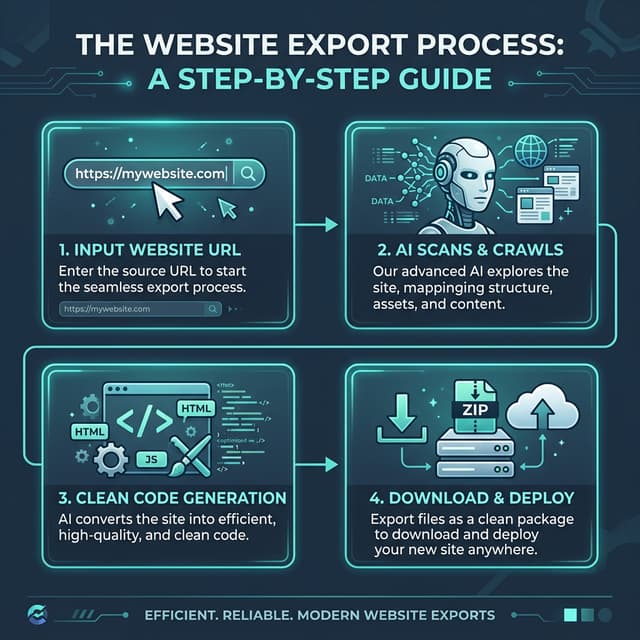
Export your site to HTML
Paste a public URL. The free plan exports a single page with no card required.
Downloading an entire website means saving every page you need together with its stylesheets, scripts, images and fonts, and rewriting the links between pages so the copy works without the original server. Which tool does that well depends on one question: does the site arrive from the server as finished HTML, or does JavaScript build it in the browser?
To download a website as a ZIP without installing anything, scan a public URL you own or are authorized to copy, choose the pages, and download the result. The rest of this guide covers every method, including the free command-line ones.
Choose a method
| Method | Best for | Runs JavaScript | Rewrites links between pages | What it misses |
|---|---|---|---|---|
| Browser Save Page As | One page, quickly | Saves what has rendered | No | Other pages, lazy-loaded media |
| wget mirror | Static sites, blogs, docs | No | Yes | Anything JavaScript builds |
| HTTrack | Static sites on Windows or Linux | No | Yes | Anything JavaScript builds |
| Desktop apps (SiteSucker, Cyotek WebCopy) | Static sites without a terminal | No | Yes | Anything JavaScript builds |
| Rendering exporter | Framer, Webflow, Wix, Squarespace, React sites | Yes | Yes | Server features: databases, accounts, payments |
Every method copies what a visitor can see. None of them can download a database, a CMS back office, user accounts, checkout or anything that runs on the server.
Method 1: save one page in the browser
- Open the page in Chrome, Edge, Firefox or Safari and scroll to the bottom so lazy-loaded images load.
- Press
Ctrl+S(Windows, Linux) orCmd+S(macOS). - Choose Webpage, Complete (Safari: Web Archive or Page Source).
You get one HTML file and a folder of assets. Links to other pages still point at the live site, so this is a snapshot of a single page, not a website.
Method 2: mirror a static site with wget
wget ships with most Linux distributions and installs on macOS with Homebrew (brew install wget). This command downloads a site and makes it browsable offline:
wget --mirror --convert-links --adjust-extension --page-requisites --no-parent https://example.com/
--mirrorfollows links recursively and keeps timestamps.--convert-linksrewrites links so the copy works from your disk.--adjust-extensionsaves pages with an.htmlextension.--page-requisitesdownloads the CSS, images and scripts each page needs.--no-parentstays inside the folder you started from.
Add --wait=1 to pause between requests so you do not overload a server, and -e robots=off only on a site you own. wget saves the HTML the server sent. If the site builds its content with JavaScript, the pages will look empty or unstyled.
Method 3: HTTrack
HTTrack is free, has a graphical interface on Windows (WinHTTrack) and runs from the command line on Linux and macOS. Create a project, paste the URL, choose Download web site(s) and let it crawl. It handles static sites well and follows the same rule as wget: it never runs JavaScript. On Framer, Webflow and Wix sites that produces blank or unstyled pages; why HTTrack breaks on no-code sites shows exactly what goes missing.
Method 4: desktop apps
SiteSucker (macOS and iOS) and Cyotek WebCopy (Windows) wrap the same idea in a desktop interface: enter a URL, set how deep to follow links, and download. They are convenient on static sites and share the same limit on JavaScript-built pages.
Method 5: a rendering website exporter
Sites made with Framer, Webflow, Wix, Squarespace or a JavaScript framework are finished in the browser: styles, images, animations and whole sections appear only after scripts run. A rendering exporter opens every page in a real browser, waits for it to finish, scrolls it so lazy content loads, then saves what the browser drew and downloads the files it used.
With NoCodeExport:
- Paste the published URL of a site you own or may copy and run the scan.
- Choose the pages to include.
- Review the files, then download the ZIP of HTML, CSS, JavaScript and assets.
The Free plan exports one page and keeps images and fonts linked to the original site. Paid exports (Pro, or a one-time Site Pass for a single site) include up to 100 pages and download the assets into the ZIP. Before you pay, you can see a working preview of the export built from up to 30 of your pages.
Why a downloaded website looks broken
- Blank or unstyled pages: the site builds its layout with JavaScript and the tool only saved the server's HTML. Use a rendering exporter.
- Missing images: images load as you scroll (
loading="lazy",data-src, CSS backgrounds). Scroll before saving, or use a tool that does. - Links go back to the live site: the tool did not rewrite internal links. With wget, add
--convert-links. - Fonts fall back: the font files are on another domain or licensed only for the original site.
- Forms, search and logins do nothing: those need a server. Point forms at a form service, and keep dynamic features on a real backend.
Test the copy before you rely on it
Opening index.html by double-clicking loads it from file://, where browsers block many scripts and root-relative links. Serve the folder instead:
npx serve .
or python3 -m http.server 8000, then open every page at desktop and mobile widths, click through the navigation and check the browser console for failed requests. Running an exported site locally covers this step in detail.
Downloading a website you do not own
Being able to see a page does not give you the right to copy it. Download your own site, a client's site with written permission, or content whose license allows it. Designs, text, images, fonts and templates can each carry their own rights. Do not bypass logins, paywalls or other access controls, and respect robots.txt and rate limits when you crawl someone else's server.
Which method should you use?
Use Save Page As for one page, wget or HTTrack for a static site, and a rendering exporter for a site built with Framer, Webflow, Wix, Squarespace or JavaScript. Whatever you use, serve the copy locally and click through it before you cancel the original hosting.