
When you export code from visual builders, it can sometimes be "div soup"—meaning everything is just a generic <div> tag. While this renders visually correct, it is a nightmare for search engines and screen readers.
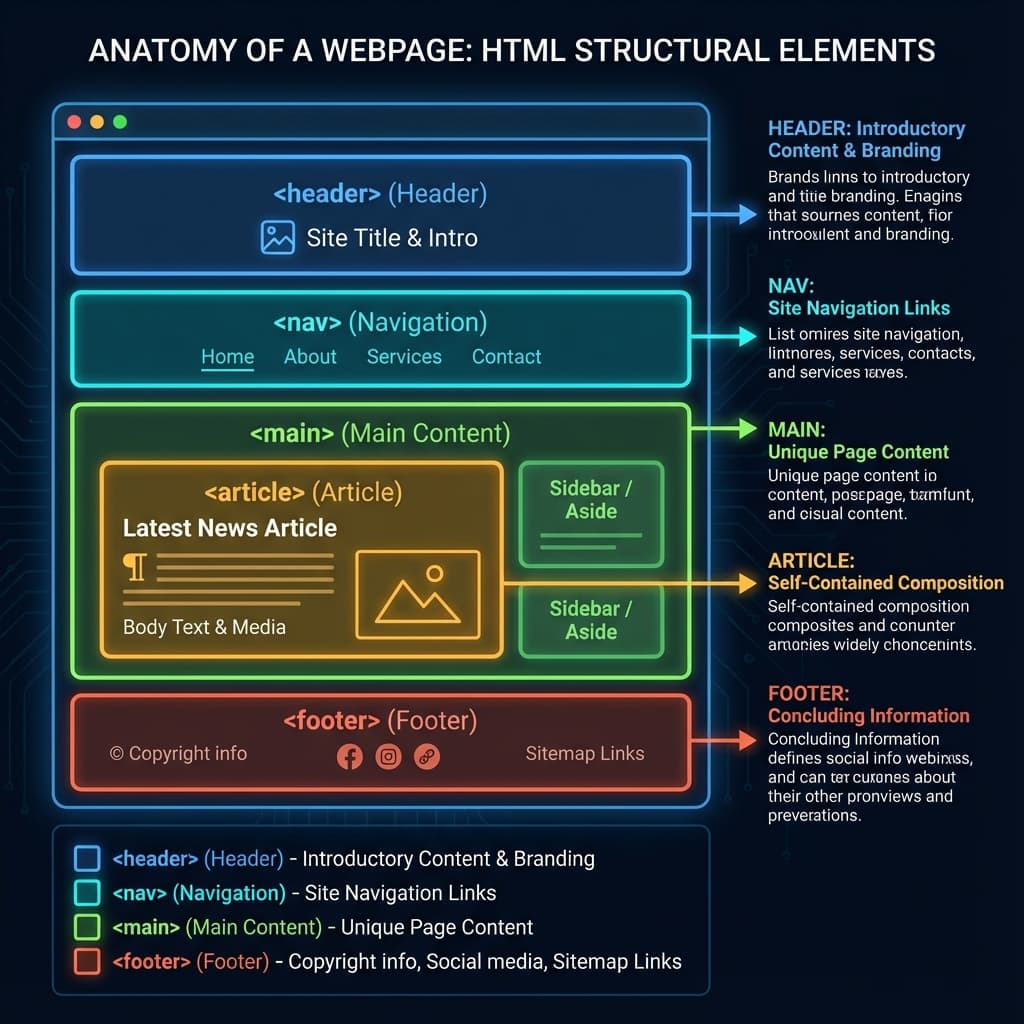
What is Semantic HTML?
Semantic HTML means using tags that convey meaning about the content they contain.
<header>instead of<div class="header"><article>instead of<div class="post"><button>instead of<div onClick="...">
Why It Matters
1. SEO (Search Engine Optimization)
Google's bots read your code, not your visual design. Semantic tags help them understand the hierarchy and importance of your content. A clear structure (<h1>, <h2>, <p>, <ul>) gives you an instant ranking advantage over messy sites.
2. Accessibility
Screen readers rely on these tags to navigate. Using correct semantic HTML ensures that people with visual impairments can actually consume your content.
- Buttons are clickable.
- Nav tags let users skip menus.
- Alt text describes images.
3. Maintainability
Code that describes itself is easier to read and update later.
How NoCodeExport Helps
Our algorithms don't just dump code. We attempt to intelligently map visual elements to their proper semantic tags during the export process. However, you should always double-check:
- Ensure you have only one
<h1>per page. - Use
<button>for actions and<a>for links. - Always check your image Alt tags.
Conclusion
Good code is about more than just not crashing. It's about being inclusive and understandable. Semantic HTML is the foundation of a professional web presence.